


In the App Store on your iPhone and Mac, it's very easy to install the WhatsApp app. On the iPad, this is not yet possible, but there is a handy trick that allows you to use WhatsApp on your refurbished iPad!
Step 1: Connect the iPhone and iPad to WiFi.
Step 2: Open the page https://web.whatsapp.com in the browser on your iPad.
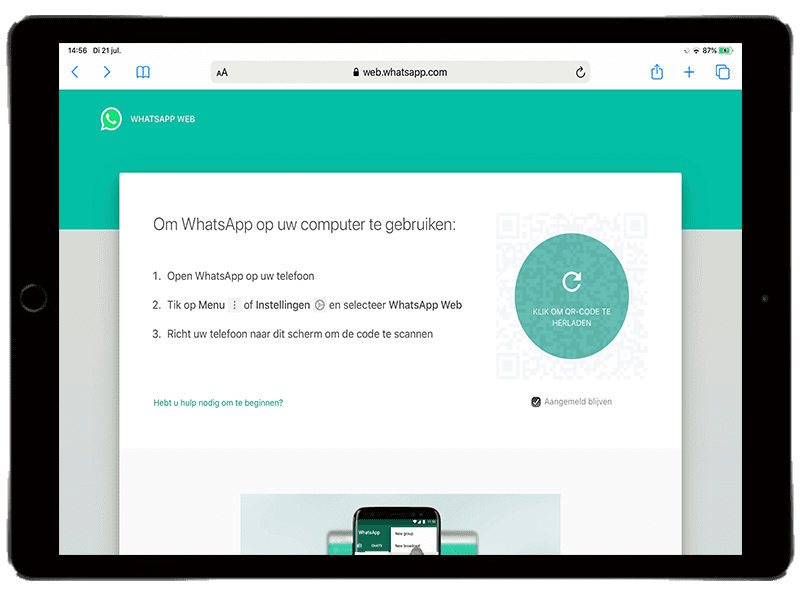
Step 3: Open WhatsApp on your iPhone.
Step 4: Click on settings at the bottom of the screen.
Step 5: Click on 'WhatsApp Web/Desktop' and scan the QR code.
Step 6: Your browser will now open the web version of WhatsApp!
Step 7: By clicking on the 'share' icon at the top of the screen (a square with an upward-pointing arrow), you can create a shortcut on your home screen. This way, you always have WhatsApp at hand.
WhatsApp on your iPad is not as feature-rich as on your iPhone, but all basic tasks like sending and receiving messages work just as smoothly as on your refurbished iPhone. A drawback is that you won't receive notifications when you get a message. You'll have to check this manually on your iPad or wait until your iPhone vibrates in your pocket.
Not only WhatsApp cannot be downloaded from the App Store on your iPad, but Instagram has also not yet released an application for Apple's popular tablet. Why the developer of WhatsApp and Instagram (Facebook) has not yet created a proper app for this is still a mystery.
Step 1: Connect the iPhone and iPad to WiFi.
Step 2: Open the page https://web.whatsapp.com in the browser on your iPad.
Step 3: Open WhatsApp on your iPhone.
Step 4: Click on settings at the bottom of the screen.
Step 5: Click on 'WhatsApp Web/Desktop' and scan the QR code.
Step 6: Your browser will now open the web version of WhatsApp!
Step 7: By clicking on the 'share' icon at the top of the screen (a square with an upward-pointing arrow), you can create a shortcut on your home screen. This way, you always have WhatsApp at hand.
WhatsApp on your iPad is not as feature-rich as on your iPhone, but all basic tasks like sending and receiving messages work just as smoothly as on your refurbished iPhone. A drawback is that you won't receive notifications when you get a message. You'll have to check this manually on your iPad or wait until your iPhone vibrates in your pocket.
Not only WhatsApp cannot be downloaded from the App Store on your iPad, but Instagram has also not yet released an application for Apple's popular tablet. Why the developer of WhatsApp and Instagram (Facebook) has not yet created a proper app for this is still a mystery.